
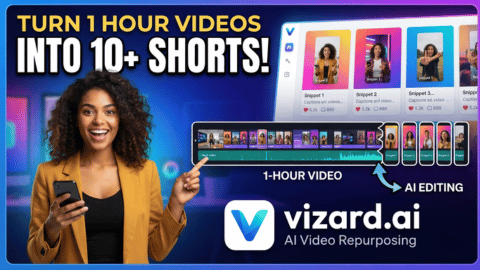
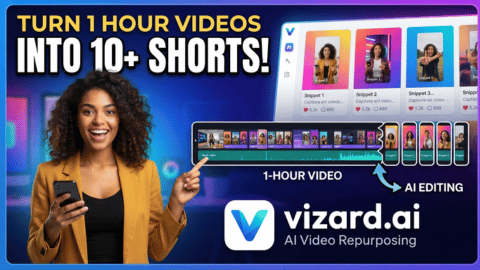
In 2026, short-form video is the undisputed king of social media growth. But for podcasters, coaches, and marketers, manually chopping up a 60-minute YouTube video or Zoom recording into engaging TikTok, Reels, and YouTube Shorts clips is a massive, time-consuming bottleneck.
Enter Vizard.ai (vizard.ai), an AI-powered video editing and clipping platform designed to automate this exact workflow. With its intelligent speaker detection, auto-captions, and viral-ready templates, Vizard allows you to turn one long-form video into dozens of high-performing short clips in minutes.
In this comprehensive review, we’ll break down Vizard.ai pricing, explore its standout features, compare it to top competitors, and help you decide if it’s the right tool to scale your content creation workflow.
 50% OFF
Vizard.ai
50% OFF
What is Vizard.ai?
Vizard.ai is an all-in-one AI video editor that specializes in repurposing long-form content. You simply upload a video (or paste a YouTube link), and Vizard’s AI automatically identifies the most engaging highlights, reframes the video to a vertical 9:16 aspect ratio, and adds dynamic, branded captions. It also includes a built-in social media scheduler, allowing you to go from raw footage to published posts without ever leaving the platform.
Standout Features of Vizard.ai
- AI Auto-Clipping: The AI analyzes your video’s audio and visual cues to automatically extract the most viral-worthy moments, saving you hours of manual scrubbing.
- AI Auto-Reframe: Automatically detects the active speaker and keeps them centered in a vertical (9:16) frame, perfect for TikTok, Instagram Reels, and YouTube Shorts.
- Dynamic Auto-Captions & AI Emojis: Generates highly accurate, animated subtitles with customizable fonts, colors, and AI-suggested emojis to maximize viewer retention.
- AI B-Roll & Highlight Keywords: The AI can automatically suggest or insert relevant B-roll footage and highlight key spoken words to make your clips more visually engaging.
- Built-in Social Scheduler: Manage and schedule posts directly to up to 20 social media accounts from a single dashboard, streamlining your distribution workflow.
- Team Collaboration (Business Plan): Shared workspaces, brand kits, and the ability to invite team members make it ideal for agencies and growing content teams.
Vizard.ai Pricing Breakdown (2026)
Vizard uses a transparent, credit-based system where 1 credit = 1 minute of uploaded video. This makes it easy to predict your usage. All paid plans come with a 50% discount when billed annually.
1. Free Plan – Best for Testing the Waters
- Price: $0 / month
- Best for: Beginners, hobbyists, or creators wanting to test the AI’s capabilities.
- Key Features:
- 60 credits per month (60 mins of upload)
- AI-generated clips and auto-subtitling
- Export in 720p with a Vizard watermark
- 3-day video storage
- Connect 1 social media account
2. Creator Plan – Best for Solo Creators & Podcasters (Most Popular)
- Price: $14.50 / month (billed annually at $174/year, 50% off) or $29 / month (billed monthly)
- Best for: YouTubers, podcasters, and solo marketers who publish short-form content regularly.
- Key Features:
- 600 credits per month (600 mins of upload)
- No watermark and export in stunning 4K resolution
- Upload videos up to 15GB in size
- Unlimited video storage (as long as you are subscribed)
- Connect up to 6 social media accounts and schedule posts
3. Business Plan – Best for Agencies & Content Teams
- Price: $19.50 / month (billed annually at $234/year, 50% off) or $39 / month (billed monthly)
- Best for: Marketing agencies, media companies, and teams managing multiple brands.
- Key Features:
- 600+ credits per month (with options to scale higher)
- Everything in Creator, plus:
- Shared workspace and Brand Kit (custom fonts, logos, templates)
- Connect up to 20 social media accounts
- Invite team members (additional $5/month per seat)
- Unlimited cloud storage and priority support
💡 Pro Tip: If you have a large batch of videos to process, the annual Creator or Business plans offer massive savings (50% off) and ensure your workflow isn’t interrupted by monthly credit caps.
Vizard.ai vs. The Competition
- Vizard.ai vs. Opus Clip: Opus Clip is a formidable competitor with excellent virality scoring. However, Vizard edges it out by offering a more comprehensive, built-in video editor and a native social media scheduler, making it a more complete “all-in-one” workspace.
- Vizard.ai vs. Munch: Munch is a powerful, enterprise-grade tool with deep trend analysis, but it comes at a significantly higher price point. Vizard provides 90% of the same AI clipping and captioning value at a fraction of the cost, making it much more accessible for solo creators and small teams.
Pros and Cons of Vizard.ai
✅ Pros:
- Massive Time Saver: Turns hours of manual editing into a few clicks.
- All-in-One Workflow: Combines AI clipping, editing, captioning, and social scheduling in one platform.
- High-Quality Outputs: 4K export, accurate speaker detection, and polished, dynamic captions.
- Transparent Pricing: The 1 credit = 1 minute model is easy to understand, and the annual discount is highly competitive.
- Great for Teams: The Business plan’s shared workspace and brand kits are perfect for scaling agency operations.
❌ Cons:
- Credit Consumption: Uploading a 60-minute video consumes 60 credits, regardless of how many short clips you actually export from it.
- Free Plan Limitations: The 3-day storage and 720p watermark exports make the free tier strictly for testing, not production.
- Learning Curve: While the AI is smart, manually tweaking the AI-generated clips in the editor still requires a basic understanding of video pacing.
Final Verdict: Is Vizard.ai Worth It?
Absolutely, if you produce long-form video content.
If you are a podcaster, YouTuber, or coach, the Creator Plan at $14.50/month (billed annually) is an absolute no-brainer. It pays for itself by saving you hours of manual editing and helping you maintain a consistent, high-quality presence on TikTok, Reels, and Shorts without the watermark.
For marketing agencies managing multiple clients, the Business Plan offers incredible value with its brand kits, team seats, and multi-account scheduling capabilities.
Ready to Go Viral on Autopilot?
Stop wasting hours manually cutting and captioning videos. Let AI do the heavy lifting and focus on what you do best: creating great content.